C# Multidimensional Array vs Jagged Array: Key Differences
c# multidimensional array vs jagged array: Compare C# multidimensional and jagged arrays: syntax, memory layout, performance, and when to choose each for your code.
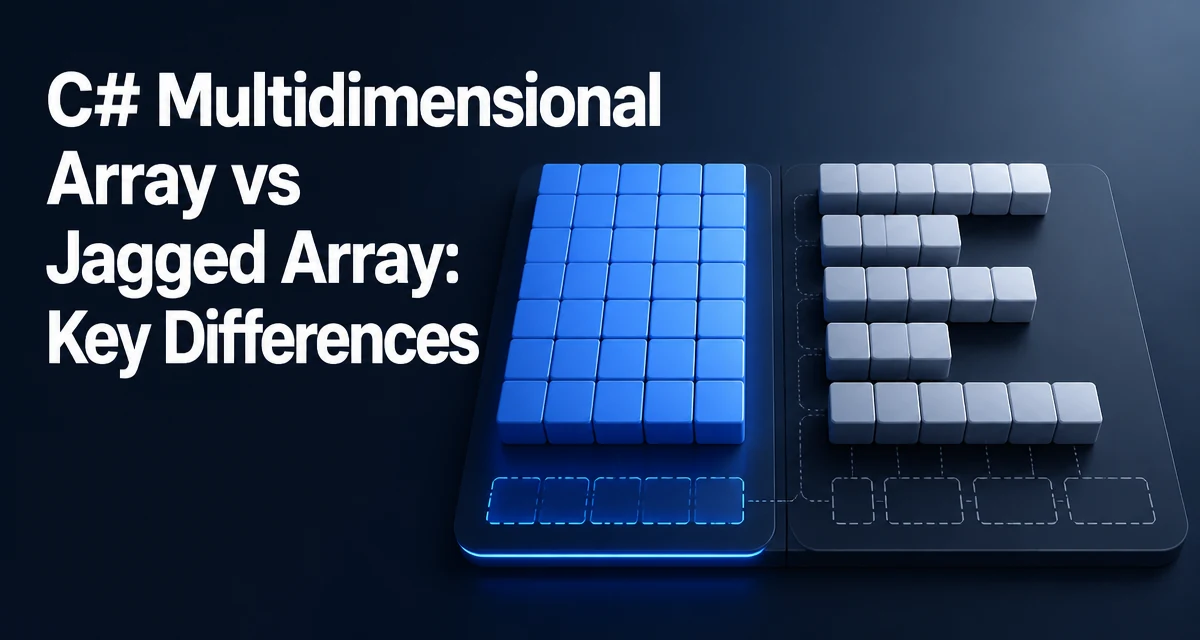
When working with tabular data in C#, you have two array shapes: multidimensional arrays like int[,] and jagged arrays like int[][]. The choice between a C# multidimensional array vs jagged array affects not only syntax but also memory layout, runtime performance, and how naturally the code expresses your data. This article examines the practical differences and gives concrete guidance for selecting the right structure.
Multidimensional Arrays: Rectangular by Design
A multidimensional array in C# is declared with a single type and multiple rank specifiers. For example, int[,] matrix = new int[3,4]; creates a 3-by-4 rectangular block. All rows have the same length, and the CLR allocates a single contiguous block of memory for the entire array. This guarantees that every element is stored in a predictable, flat layout.
Accessing an element uses comma-separated indices: matrix[i, j]. The rank is fixed at compile time, so the compiler knows the exact dimensions and can generate efficient index calculations. This makes multidimensional arrays a natural fit for mathematical matrices, image pixels, or any grid where every row has identical width.
int[,] grid = new int[2, 3];
grid[0, 0] = 1;
grid[1, 2] = 5;
Console.WriteLine(grid.Length); // 6
The Length property returns the total number of elements across all dimensions. To iterate, you typically use nested loops or the for loop with GetLength(0) and GetLength(1).
Jagged Arrays: Arrays of Arrays
A jagged array is an array whose elements are themselves arrays. Declared as int[][], each inner array can have a different length. This is why they are called "jagged"—the rows can be uneven. Memory is not a single block; instead, you have an outer array of references, and each inner array is a separate allocation on the managed heap.
int[][] jagged = new int[3][];
jagged[0] = new int[2];
jagged[1] = new int[5];
jagged[2] = new int[1];
Accessing an element uses separate index brackets: jagged[i][j]. The first index selects the inner array, the second indexes into that array. This indirection has performance implications, but it also gives you the flexibility to store rows of varying lengths without wasting space.
Memory Layout and Performance Differences
The most significant difference between these two types lies in how the CLR lays them out in memory. A multidimensional array is a single contiguous allocation. A jagged array is a collection of separate allocations. This affects cache locality, allocation overhead, and the cost of indexing.
For a multidimensional array, the index calculation is a simple arithmetic formula: base + (i * width + j) * elementSize. The entire array fits into a smaller number of cache lines, especially when you iterate in row-major order. For a jagged array, each row access requires following a reference to a separate object. If the rows are scattered in memory, the CPU cache may miss more often, slowing down tight loops.
Allocation is also different. A multidimensional array is one allocation; a jagged array requires one allocation for the outer array plus one for each inner array. For a large grid with many rows, the jagged version creates more objects, which increases GC pressure. However, if rows have very different sizes, a jagged array can save memory by not forcing a rectangular shape.
Indexing cost is another factor. The JIT compiler can optimize multidimensional array access well, but there is a known overhead for bounds checking. Jagged arrays have two bounds checks per access (one for the outer, one for the inner). In practice, the difference is small unless you are in a hot loop, but it can matter in performance-critical code.
When to Use Each: Decision Criteria
Choose a multidimensional array when:
- The data is inherently rectangular: every row has the same number of columns.
- You need a single contiguous block for better cache locality.
- You want a simpler indexing syntax with commas.
- The dimensions are fixed and known at compile time.
Choose a jagged array when:
- Rows have variable lengths (e.g., a triangular matrix or a list of lists).
- You need to swap entire rows quickly.
- You are building a structure where rows are added or removed dynamically.
- Interop with other .NET APIs that expect
T[][](e.g., some JSON serializers).
A jagged array is often more idiomatic in C# when you are working with collections of collections, especially if the data comes from a dynamic source. For example, reading a CSV file where lines have different field counts naturally maps to a jagged array.
Common Pitfalls and Edge Cases
One frequent mistake is assuming that int[,] and int[][] are interchangeable. They are not. The CLR treats them as distinct types, and you cannot assign one to the other without explicit conversion. Also, the Length property behaves differently: for a multidimensional array, it returns the total element count, not the size of the first dimension. Use GetLength(0) to get the number of rows.
Another edge case is null handling in jagged arrays. The outer array is initialized with null references. You must allocate each inner array before using it, or you will get a NullReferenceException. Multidimensional arrays are always fully initialized with default values, so no such issue exists.
int[][] jagged = new int[3][];
// jagged[0] is null until assigned
jagged[0] = new int[4];
When iterating, the foreach loop behaves differently. For a multidimensional array, foreach yields each element in row-major order. For a jagged array, foreach yields each inner array, so you need a nested loop to reach the actual values.
Practical Example: Matrix Operations
Consider a simple matrix addition. With a multidimensional array, the code is straightforward:
public static int[,] AddMatrices(int[,] a, int[,] b)
{
    int rows = a.GetLength(0);
    int cols = a.GetLength(1);
    int[,] result = new int[rows, cols];
    for (int i = 0; i < rows; i++)
    {
        for (int j = 0; j < cols; j++)
        {
            result[i, j] = a[i, j] + b[i, j];
        }
    }
    return result;
}
With a jagged array, you must check that each row has the same length if you want to mimic rectangular behavior, or handle variable lengths explicitly:
public static int[][] AddJagged(int[][] a, int[][] b)
{
    int rows = a.Length;
    int[][] result = new int[rows][];
    for (int i = 0; i < rows; i++)
    {
        int cols = a[i].Length;
        result[i] = new int[cols];
        for (int j = 0; j < cols; j++)
        {
            result[i][j] = a[i][j] + b[i][j];
        }
    }
    return result;
}
The jagged version is more flexible but also more verbose. If you know the data is always rectangular, the multidimensional version is cleaner and likely faster due to contiguous memory.
Compatibility and Interop Considerations
Some .NET APIs expect a specific array shape. For example, System.Drawing.Bitmap uses a one-dimensional array of pixel data, not a 2D array. However, many numerical libraries like Math.NET Numerics use their own matrix types. When interoperating with C or C++ code via P/Invoke, jagged arrays are not directly supported; you must flatten the data into a single-dimensional array. Multidimensional arrays are also not blittable in all cases, so you often need to copy data into a flat buffer.
For JSON serialization, System.Text.Json handles both int[,] and int[][], but the output format differs. A multidimensional array serializes as nested arrays with consistent inner lengths, while a jagged array serializes as an array of arrays, which is more natural for JSON. If you are building a REST API, jagged arrays often map more directly to JSON structures.
Another consideration is the Array class methods. Many LINQ extensions like Select or Where work on IEnumerable<T>, and jagged arrays are easier to use with LINQ because you can flatten them with SelectMany. Multidimensional arrays do not implement IEnumerable<T> directly; you need to cast or use Cast<T>().
In terms of maintainability, jagged arrays can be more confusing for developers who are not familiar with the syntax. The double indexing a[i][j] is less readable than a[i, j] when the data is conceptually two-dimensional. On the other hand, jagged arrays allow you to have rows of different types if you use object[] or a base class, which is impossible with a multidimensional array.
Ultimately, the decision rests on the shape of your data and the performance characteristics you need. For fixed, rectangular grids, prefer multidimensional arrays. For dynamic, ragged data, jagged arrays give you the necessary flexibility. Understanding the memory layout and runtime behavior of each will help you write code that is both correct and efficient.