Java map vs flatMap: Key Differences and Use Cases
java map vs flatmap: Understand the difference between Java's map and flatMap operations on streams and Optionals, with practical examples and decision criteria.
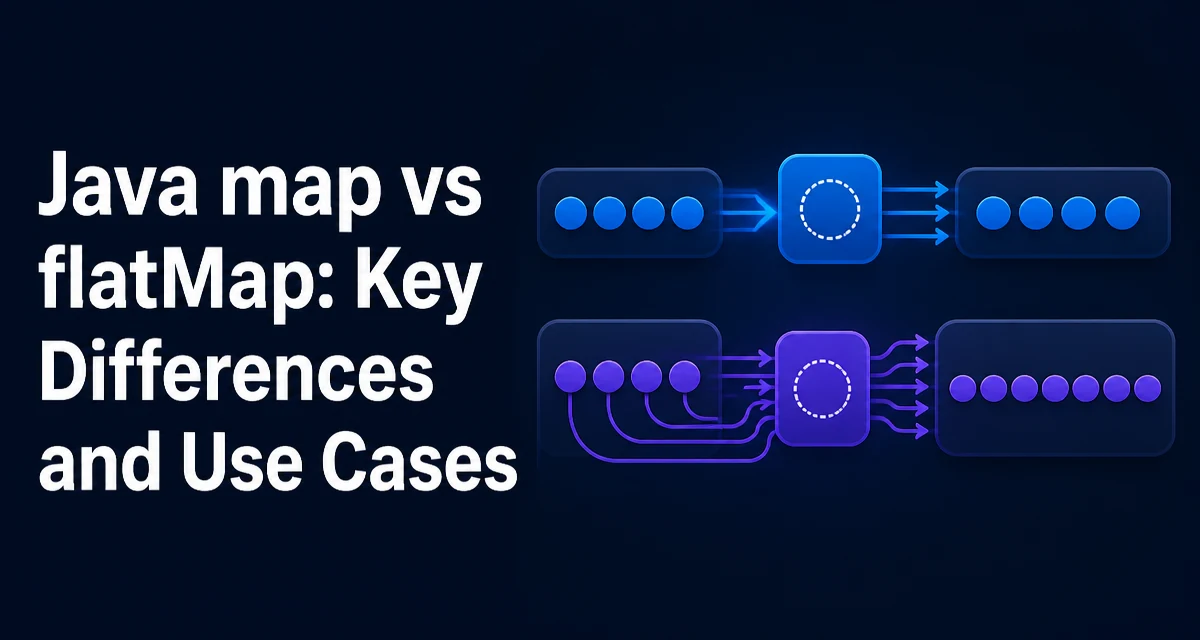
When working with Java streams, one of the most common questions is java map vs flatmap: what exactly distinguishes them, and when should you use each? Both are intermediate operations that transform elements, but they handle the structure of the result differently. Understanding that difference is key to writing clean, correct stream pipelines.
What map and flatMap Do in Java Streams
The map operation applies a given function to each element of the stream and collects the results into a new stream. The output stream always has the same number of elements as the input stream. For example, if you have a stream of strings and you map each string to its length, you get a stream of integers where each integer corresponds to exactly one input string.
The flatMap operation is more flexible. It takes a function that returns a Stream for each input element, and then flattens all those individual streams into a single output stream. This means the output stream can have a different number of elements than the input stream—potentially more, fewer, or even zero.
List<String> words = List.of("hello", "world");

// map: each word becomes its length
List<Integer> lengths = words.stream()
    .map(String::length)
    .collect(Collectors.toList());

// flatMap: each word becomes a stream of its characters
List<Character> chars = words.stream()
    .flatMap(word -> word.chars().mapToObj(c -> (char) c))
    .collect(Collectors.toList());
In the first case, map produces one result per word. In the second, flatMap expands each word into multiple characters and then merges those character streams into a single stream.
The Core Difference: One-to-One vs One-to-Many
The fundamental distinction lies in the return type of the function you pass. With map, the function returns a single value. With flatMap, the function returns a Stream. This is not a stylistic choice; it changes the shape of the resulting stream.
When you use map, the output stream has exactly the same number of elements as the input. Each input element is transformed into exactly one output element. When you use flatMap, the function can return a stream of any size, and all those streams are concatenated. This makes flatMap suitable for one-to-many transformations, such as splitting a sentence into words, expanding a collection, or handling optional values that may or may not be present.
Using map for Simple Transformations
map is the right choice when your transformation is one-to-one. Typical use cases include extracting a field from an object, converting a type, or applying a calculation. For instance, given a list of orders, you might want to extract the customer names:
List<Order> orders = getOrders();
List<String> customerNames = orders.stream()
    .map(Order::getCustomerName)
    .collect(Collectors.toList());
Each Order produces exactly one String, so map is the natural fit. It is also more readable than flatMap for such cases because the intent is clear: transform each element independently.
Using flatMap to Flatten Nested Structures
flatMap shines when you need to flatten nested structures. A common scenario is a list of lists. Suppose you have a List<List<Integer>> and you want a single List<Integer> containing all elements. Using map would give you a stream of streams, which is rarely what you need. flatMap solves this directly:
List<List<Integer>> numbers = List.of(List.of(1, 2), List.of(3, 4));
List<Integer> flattened = numbers.stream()
    .flatMap(List::stream)
    .collect(Collectors.toList());
The function List::stream returns a stream for each inner list, and flatMap concatenates them into one stream. This pattern is also useful when you have a stream of collections, arrays, or any object that can be converted to a stream.
Another common use is splitting strings into words:
List<String> sentences = List.of("Hello world", "Java streams");
List<String> words = sentences.stream()
    .flatMap(sentence -> Arrays.stream(sentence.split(" ")))
    .collect(Collectors.toList());
Here, each sentence expands into multiple words, so flatMap is the appropriate operation.
flatMap with Optional
The Optional class also provides map and flatMap, and the distinction is analogous. Optional.map applies a function to the value if present and wraps the result in an Optional. Optional.flatMap takes a function that returns an Optional and avoids double wrapping.
Optional<String> name = Optional.of("John");
Optional<Integer> length = name.map(String::length); // Optional<Integer>

Optional<String> upper = name.flatMap(n -> Optional.of(n.toUpperCase())); // Optional<String>
If you used map with a function that returns an Optional, you would get an Optional<Optional<String>>. flatMap flattens that into a single Optional. This is particularly useful when chaining multiple operations that each return an Optional.
When to Choose map Over flatMap and Vice Versa
The choice depends on the shape of your transformation. Use map when each input element produces exactly one output element. Use flatMap when the function returns a stream (or an Optional in the case of Optional) and you need to flatten the result.
| Criterion | map | flatMap |
|---|---|---|
| Function return type | Single value | Stream or Optional |
| Output stream size | Same as input | Varies (can be more or fewer) |
| Typical use | Simple transformation | Flattening nested structures |
| Optional behavior | Wraps result in Optional | Flattens Optional |
If you find yourself writing map(x -> x.stream()) and then dealing with a stream of streams, you almost certainly want flatMap instead. Similarly, if you are using Optional.map and the function returns an Optional, you should switch to flatMap to avoid nested optionals.
Performance and Runtime Considerations
Both map and flatMap are lazy intermediate operations; they do not execute until a terminal operation like collect or forEach is invoked. The main performance difference is that flatMap creates a new stream for each input element, which adds some overhead compared to map. In practice, the JVM handles this efficiently, and the overhead is rarely a bottleneck unless you are processing extremely large streams.
A more important consideration is avoiding unnecessary intermediate operations. For example, if your transformation is one-to-one, using flatMap with a function that returns a single-element stream is wasteful and less readable. Conversely, using map when you need to flatten will produce a stream of streams, forcing you to add an extra flatMap later. Choosing the correct operation from the start keeps the pipeline clean and avoids extra allocations.
Common Pitfalls and Misconceptions
One common mistake is using flatMap when map is sufficient. If the function returns a single value, flatMap will not compile because it expects a Stream return type. For example, words.stream().flatMap(String::length) is invalid because String::length returns an int, not a Stream.
Another pitfall is confusing Optional's map and flatMap. When you chain operations that each return an Optional, using map leads to nested optionals. This can cause subtle bugs when you later try to read the value. Always use flatMap when the transformation itself returns an Optional.
Finally, remember that flatMap can produce zero elements for a given input. If the function returns an empty stream, those elements simply disappear from the result. This is useful for filtering, but it also means you should not assume the output size matches the input.
Practical Example: Combining map and flatMap in a Realistic Pipeline
Consider a system that processes orders, where each order contains a list of items. You want to collect all item names from all orders into a single list. This requires flattening the orders to their items, then mapping each item to its name. The natural pipeline uses both operations:
List<Order> orders = getOrders();
List<String> allItemNames = orders.stream()
    .flatMap(order -> order.getItems().stream())
    .map(Item::getName)
    .collect(Collectors.toList());
Here, flatMap expands each order into a stream of its items, and then map transforms each item into its name. The result is a flat list of strings. This pattern is common in data processing and demonstrates how map and flatMap complement each other. Using only map would produce a stream of streams, and using only flatMap would require a function that returns a stream of names, which is less direct.
Understanding the distinction between map and flatMap is not just about syntax—it is about modeling the shape of your data transformation correctly. When you need a one-to-one transformation, map is the tool. When you need to collapse nested structures or handle optional values, flatMap is the right choice. Keeping this distinction in mind will make your stream pipelines more readable and less error-prone.