Java Shallow Copy vs Deep Copy: Key Differences
java shallow copy vs deep copy: Understand the differences between shallow and deep copy in Java, including mutable field handling, performance tradeoffs, and when to...
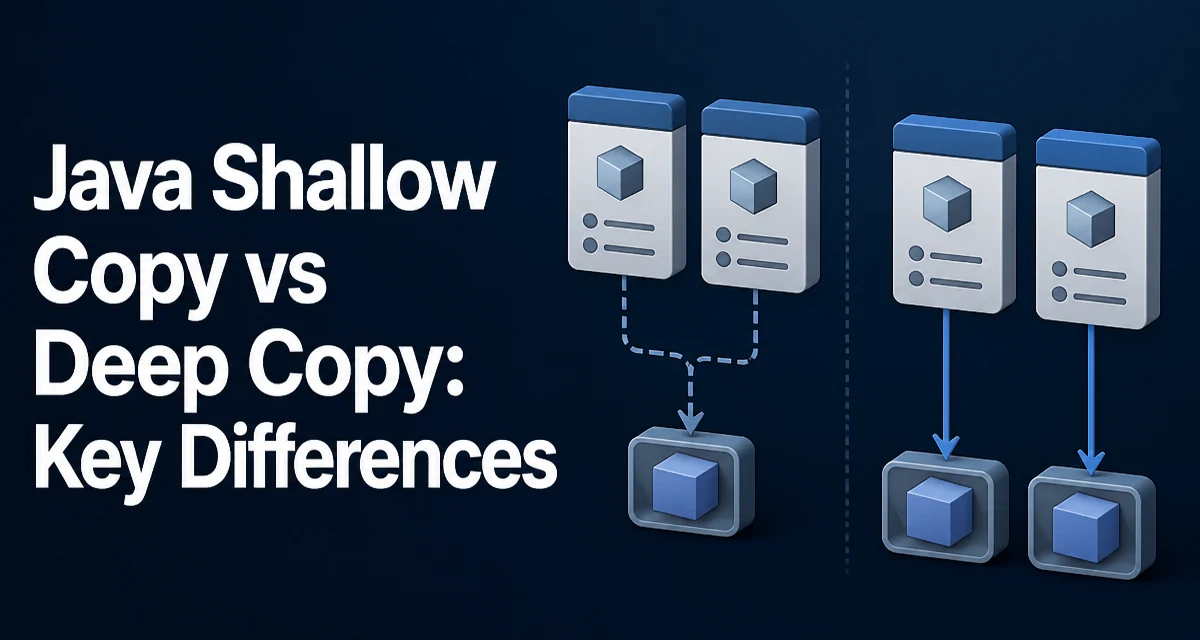
java shallow copy vs deep copy requires a clear understanding of the core syntax, runtime behavior, and practical implementation patterns demonstrated in the examples below.
When you assign one Java object to another variable, you only copy the reference, not the object itself. The object remains in memory, and both variables point to the same instance. To actually copy an object, you need either a shallow copy or a deep copy. The choice matters because it determines whether changes to the copy affect the original object, especially when the object contains mutable fields.
What Shallow Copy Means in Java
A shallow copy creates a new object that shares the same field values as the original. For primitive fields, the value is copied. For reference fields, the copied object holds the same reference, meaning both the original and the copy point to the same nested object unless you explicitly handle them.
Consider a class that represents a person with an address, where the address is a separate mutable object.
public class Address {
    public String street;
    public String city;
}

public class Person {
    public String name;
    public Address address;
}
A shallow copy can be performed manually by creating a new Person and assigning each field:
Person original = new Person();
original.name = "Alice";
original.address = new Address();
original.address.city = "Paris";

Person shallowCopy = new Person();
shallowCopy.name = original.name;
shallowCopy.address = original.address;
Here, shallowCopy.name is a copy of the string value, but shallowCopy.address points to the same Address object. If you modify shallowCopy.address.city, original.address.city also changes. The name field is safe because strings are immutable in Java; modifying it means assigning a new reference.
The Object.clone() method in Java provides a shallow copy by default if a class implements the Cloneable interface and overrides clone() appropriately.
public class Person implements Cloneable {
    public String name;
    public Address address;

    @Override
    public Object clone() throws CloneNotSupportedException {
        return super.clone();
    }
}
The default clone() copies all fields, including reference fields, producing a shallow copy. However, clone() requires care: the class must implement Cloneable, and the method must be overridden as public to be accessible. Without Cloneable, super.clone() throws CloneNotSupportedException. Many production codebases avoid clone() due to these constraints and prefer explicit copy constructors or factory methods.
What Deep Copy Means in Java
A deep copy creates a new object where every mutable field is copied recursively, meaning the copy has its own nested objects that are independent of the original. Changes to the copy's fields do not affect the original.
Using the Person example, a deep copy must create a new Address object and assign it:
Person deepCopy = new Person();
deepCopy.name = original.name;
deepCopy.address = new Address();
deepCopy.address.street = original.address.street;
deepCopy.address.city = original.address.city;
Now modifying deepCopy.address.city leaves original.address.city unchanged.
Manual deep copy works fine for simple object graphs, but it becomes tedious and error-prone when the graph is large or contains collections, arrays, or nested objects. Two common generic approaches are serialization and recursive copying.
The serialization approach serializes the original object to a byte stream and then deserializes it to create a new object. In Java, this requires the class to implement Serializable.
import java.io.*;

public class DeepCopyUtil {
    public static <T> T copy(T original) throws IOException, ClassNotFoundException {
        ByteArrayOutputStream bos = new ByteArrayOutputStream();
        ObjectOutputStream oos = new ObjectOutputStream(bos);
        oos.writeObject(original);
        oos.close();

        ByteArrayInputStream bis = new ByteArrayInputStream(bos.toByteArray());
        ObjectInputStream ois = new ObjectInputStream(bis);
        @SuppressWarnings("unchecked")
        T copy = (T) ois.readObject();
        ois.close();
        return copy;
    }
}
This works for any object graph that is fully serializable, but it has notable limitations. It does not work with non-serializable classes, static fields are not serialized, and transient fields are skipped with null values in the copy. Serialization also has a runtime cost, as it converts objects to bytes and back.
Another approach is a manual recursive copy method, which gives you full control but requires writing traversal logic for every class.
public class Person {
    // fields as before

    public Person deepCopy() {
        Person copy = new Person();
        copy.name = this.name;
        copy.address = new Address();
        copy.address.street = this.address.street;
        copy.address.city = this.address.city;
        return copy;
    }
}
This is explicit and clear, but it must be updated whenever the class structure changes.
Comparing Shallow and Deep Copy
The primary difference lies in how mutable reference fields are handled. The following table summarizes the behavior:
| Aspect | Shallow Copy | Deep Copy |
|---|---|---|
| New top-level object | Yes | Yes |
| Primitive fields | Copied by value | Copied by value |
| Mutable reference fields | Shared between original and copy | Duplicated, independent |
| Immutable reference fields | Shared (safe since immutable) | Copied reference or value |
| Complexity | Simple | More complex, recursive |
| Runtime cost | Generally low | Higher, especially with serialization |
| Data independence | No, nested objects shared | Yes, fully independent |
For immutable fields, sharing the reference is usually harmless because they cannot be changed. Common immutable classes in Java include String, Integer, and LocalDate. For mutable fields such as arrays, ArrayList, or custom classes, the copy's behavior diverges.
How to Choose Between Shallow and Deep Copy
Use a shallow copy when you want the new object to share the same mutable sub-objects deliberately. This is typical when the copy is meant to be a lightweight view or when the nested objects are large and should not be duplicated. It is also appropriate when the nested objects are effectively treated as read-only in the context of the copy.
Use a deep copy when the new object must be fully independent. Examples include storing a snapshot of an object at a point in time, passing data to a background thread that may modify fields, or implementing undo/redo functionality where the history should not change when the current state changes.
If you are unsure, consider whether mutating the copy's nested fields would cause bugs. If the copy's mutation would incorrectly affect the original, a deep copy is safer. If sharing is acceptable, a shallow copy saves memory and reduces copy time.
Performance and Memory Considerations
Shallow copy is typically faster and uses less memory because it allocates only one new object and copies references. Deep copy allocates new objects for every mutable field and must traverse the entire object graph. With large graphs, deep copy can become significantly more expensive.
Serialization-based deep copy is often the slowest because it involves stream I/O and reflection. Manual recursive copying avoids stream overhead but still requires allocating new objects. There is no free lunch: deep copy inherently duplicates data, and the cost scales with the size and depth of the object graph.
When performance is critical, you might choose a shallow copy where possible to avoid unnecessary allocation. However, correctness should come first—if a bug arises from shared mutable state, the performance gain is not worth it.
Common Pitfalls with Copying in Java
A frequent mistake is assuming that clone() on a collection produces a deep copy. For example, ArrayList.clone() returns a shallow copy: the list contains the same element references. Modifying an element through the cloned list affects the original list.
ArrayList<Address> originalList = new ArrayList<>();
Address a = new Address();
a.city = "Rome";
originalList.add(a);

ArrayList<Address> copyList = (ArrayList<Address>) originalList.clone();
copyList.get(0).city = "Milan";
// originalList.get(0).city is now "Milan"
To create a deep copy of a collection, you must copy each element individually, for example using a stream and a copy method:
List<Address> deepCopyList = originalList.stream()
        .map(addr -> {
            Address copy = new Address();
            copy.street = addr.street;
            copy.city = addr.city;
            return copy;
        })
        .collect(Collectors.toList());
Another pitfall is copying a field that is an array. Arrays.copyOf() and clone() on arrays create shallow copies. For primitive arrays, this is effectively a deep copy because primitives hold values. For reference arrays, the elements are still shared.
Finally, be aware that a copy constructor that simply assigns a reference field is shallow. If the class has mutable fields and you need independence, the copy constructor must also copy those fields.
Copying in Real-World Libraries and Frameworks
Many Java libraries provide utilities for copying objects. For example, Apache Commons Lang offers SerializationUtils.clone(), which performs a deep copy via serialization. Google's Gson or Jackson can be used to deep-copy by serializing to JSON and deserializing back.
// Using Jackson
ObjectMapper mapper = new ObjectMapper();
Person copy = mapper.readValue(mapper.writeValueAsString(original), Person.class);
These approaches can be convenient, but they require the class to have a no-argument constructor and proper getters/setters for Jackson, or implement Serializable for SerializationUtils. They also incur extra performance overhead and may not handle cycles correctly unless the library supports them.
For critical production code, a manual deep copy method is often the most maintainable because it is explicit and does not rely on reflection or serialization details. It also allows you to control exactly which fields are copied and how, which is useful when some fields are intentionally shared or excluded.
The tradeoff between libraries and manual copying is clarity versus convenience. If a library's behavior is well understood and the object graph is simple, using it can reduce boilerplate. However, when the object graph is complex or performance-sensitive, a hand-written copy method offers the most control and predictability.
Ultimately, the right choice depends on your data model and the behavior you require. Understanding the distinction between shallow and deep copy is essential to avoid subtle bugs where two supposedly separate objects unexpectedly share state. Always verify that your copy method produces the level of independence your application relies on.