Java Stream map vs flatMap: Key Differences
java stream map vs flatmap: Understand the difference between Java Stream map and flatMap, when to use each, and how they affect stream processing.
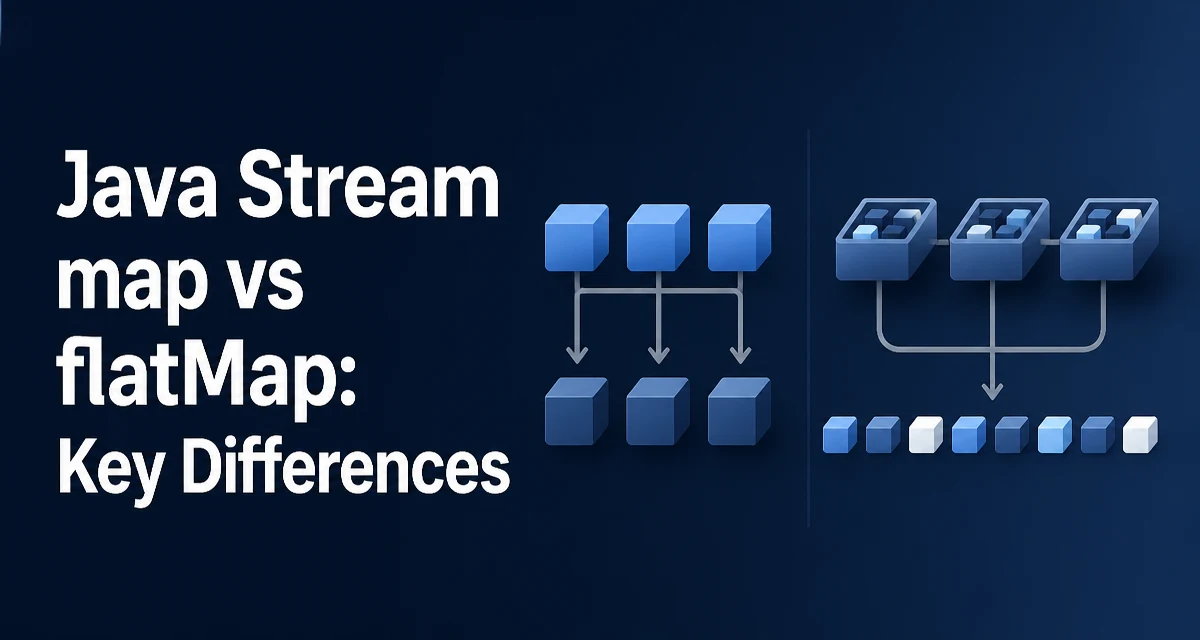
The java stream map vs flatmap question comes up whenever a developer needs to transform stream elements but isn't sure whether the transformation produces one output per input or a variable number of outputs. The short version: map applies a function that returns a single value for each element, while flatMap applies a function that returns a stream for each element and then flattens those streams into a single stream. That distinction changes both the shape of the result and the way you structure your pipeline.
The Core Difference Between map and flatMap
Both map and flatMap are intermediate operations on Stream<T>. They both take a Function as an argument, but the return type of that function differs. map expects a function that returns a single value (any type R), producing a Stream<R>. flatMap expects a function that returns a Stream<R>, and it concatenates all those streams into one Stream<R>.
Stream<String> words = Stream.of("hello", "world");
Stream<String> upper = words.map(String::toUpperCase); // Stream<String>

Stream<String> letters = words.flatMap(w -> w.chars().mapToObj(c -> (char) c)); // Stream<Character>
In the first example, each word becomes one uppercase word. In the second, each word becomes a stream of its characters, and flatMap merges those character streams into a single stream.
How map Transforms Each Element
map is a one-to-one transformation. For every element in the source stream, the function produces exactly one element in the output stream. This is useful for converting types, extracting fields, or applying a calculation without changing the stream size.
List<Order> orders = getOrders();
List<BigDecimal> totals = orders.stream()
    .map(Order::getTotal)
    .collect(Collectors.toList());
Here, each Order becomes its total value. The number of elements remains the same. The function must not return null unless you want null in the result stream, which can cause NullPointerException later in the pipeline.
map is also used to convert a stream of one type to another, such as Stream<String> to Stream<Integer> via Integer::parseInt. The mapping function is applied lazily as elements are consumed, so the entire stream is not processed upfront.
How flatMap Flattens Nested Streams
flatMap is a one-to-many transformation. The function returns a stream for each input element, and flatMap merges all those streams into a single stream. This is essential when each element can expand into zero, one, or many elements.
A common use case is splitting a sentence into words:
List<String> sentences = List.of("Hello world", "Java streams");
List<String> words = sentences.stream()
    .flatMap(sentence -> Arrays.stream(sentence.split(" ")))
    .collect(Collectors.toList());
// words = [Hello, world, Java, streams]
Each sentence becomes a stream of words, and flatMap concatenates those streams. If a sentence is empty, its stream is empty, and it contributes nothing to the result.
flatMap also handles cases where the mapping function may return an empty stream. For example, filtering out invalid values while transforming:
List<String> numbers = List.of("1", "abc", "3");
List<Integer> valid = numbers.stream()
    .flatMap(s -> {
        try {
            return Stream.of(Integer.parseInt(s));
        } catch (NumberFormatException e) {
            return Stream.empty();
        }
    })
    .collect(Collectors.toList());
// valid = [1, 3]
This is a common pattern for parsing and skipping invalid entries without using filter separately.
When to Use map vs flatMap
The choice depends on the shape of the function's return value. If the function returns a single object, use map. If it returns a Stream, Optional, or any other iterable that you want to flatten, use flatMap.
| Situation | Operation | Reason |
|---|---|---|
| Convert each element to a single value | map | One-to-one mapping |
| Extract a field from each object | map | One-to-one mapping |
| Split each element into multiple elements | flatMap | One-to-many mapping |
| Transform each element and filter out some | flatMap | Return empty stream for skipped elements |
| Combine multiple streams into one | flatMap | Flatten nested streams |
For example, if you have a list of Customer objects and each has a list of Order objects, and you want a stream of all orders, flatMap is the natural choice:
List<Order> allOrders = customers.stream()
    .flatMap(customer -> customer.getOrders().stream())
    .collect(Collectors.toList());
If you only needed each customer's name, map would be simpler.
Performance and Lazy Evaluation Considerations
Both map and flatMap are lazy operations. They do not process elements until a terminal operation is invoked. This means the mapping function is applied only to elements that actually reach the terminal operation, which can save work when combined with short-circuiting operations like limit or findFirst.
flatMap has a slightly higher overhead than map because it creates a new stream for each input element and then merges those streams. In most cases this overhead is negligible, but it can matter when processing very large streams with millions of elements. The cost is mainly object allocation for the intermediate streams. If the mapping function returns a stream that is already available, such as a collection's stream() method, the overhead is minimal.
Another consideration is that flatMap cannot be parallelized as effectively as map in some cases because the inner streams may have different sizes, causing uneven work distribution. If you need predictable parallel performance, measure the actual behavior with your data. Avoid assuming that flatMap is always slower; the dominant factor is usually the cost of the mapping function itself.
Common Mistakes and How to Avoid Them
A frequent mistake is using flatMap when map is sufficient, which complicates the code without benefit. For example:
// Overly complex: each element becomes a single-element stream
Stream<String> result = list.stream()
    .flatMap(s -> Stream.of(s.toUpperCase()));
// Better: map
Stream<String> result = list.stream().map(String::toUpperCase);
Another mistake is forgetting that flatMap expects a stream, not a collection. If you have a method that returns a List, you must call .stream() on it inside the lambda. Returning the list directly will cause a compilation error.
Also, be careful with flatMap and Optional. Stream.flatMap works with streams, not optionals. If you have a function that returns Optional, use flatMap on the Optional itself, not on the stream. For example:
Optional<String> opt = Optional.of("value");
Optional<Integer> length = opt.map(String::length); // works

// If you have a stream of optionals, you can use flatMap on the stream:
Stream<Optional<String>> streamOpts = ...;
Stream<String> values = streamOpts.flatMap(Optional::stream); // Java 9+
Using Optional.stream() converts an Optional to a stream of zero or one element, which integrates cleanly with flatMap.
Using flatMap with Optional and Other Types
flatMap is not limited to streams. The Optional class also has a flatMap method that works similarly: it takes a function that returns an Optional and flattens the nested optionals into one. This is useful for chaining operations that may return empty.
Optional<String> result = Optional.of("user")
    .flatMap(name -> findUser(name))
    .flatMap(user -> getUserEmail(user));
Each flatMap expects the function to return an Optional. If any step returns Optional.empty(), the result is empty without throwing an exception.
In stream pipelines, you might need to flatten a stream of collections. The pattern is always the same: call flatMap with a function that returns a stream from each element. For arrays, use Arrays.stream; for collections, use Collection.stream; for strings, you can use Pattern.splitAsStream or chars().
Combining map and flatMap in a Realistic Pipeline
In practice, you often use both in the same pipeline. For example, suppose you have a list of Invoice objects, each with a list of LineItem objects. You want to find all line items whose quantity exceeds 10, and then get their product names in uppercase.
List<String> productNames = invoices.stream()
    .flatMap(invoice -> invoice.getLineItems().stream())
    .filter(lineItem -> lineItem.getQuantity() > 10)
    .map(lineItem -> lineItem.getProductName().toUpperCase())
    .collect(Collectors.toList());
Here, flatMap expands each invoice into its line items, filter removes unwanted items, and map transforms the remaining items to a single string. This shows how flatMap handles the one-to-many expansion, while map handles the one-to-one final conversion. The pipeline remains readable and each operation has a clear purpose.
When you understand the return type of your mapping function, the choice between map and flatMap becomes straightforward. If you need to produce a stream for each element and merge them, use flatMap; otherwise, use map. This decision keeps your stream pipelines efficient and maintainable.