Java Thread Lifecycle: States and Transitions
java thread lifecycle: Understand the six thread states in Java, how threads transition between them, and how to monitor and manage thread lifecycle in production.
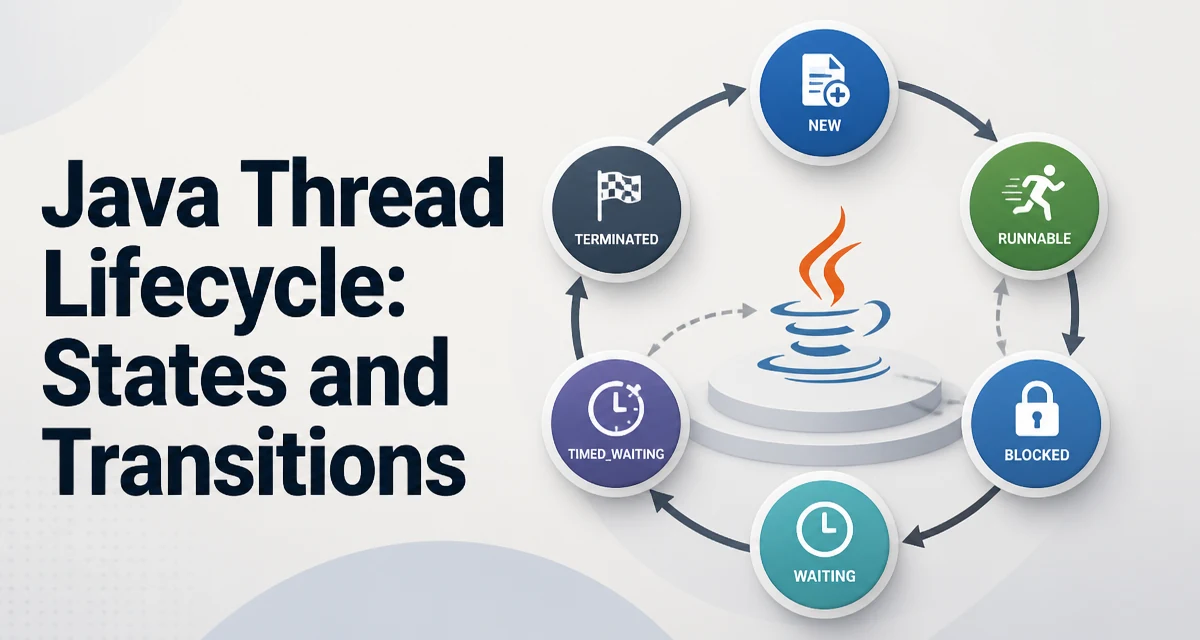
The java thread lifecycle describes the states a thread passes through from creation to termination. In Java, a thread can be in one of six states: NEW, RUNNABLE, BLOCKED, WAITING, TIMED_WAITING, and TERMINATED. These states are defined in the Thread.State enum and are visible through the getState() method. Understanding these states is essential for debugging concurrency issues, diagnosing deadlocks, and writing reliable multithreaded code.
The Six Thread States
A thread enters the NEW state when you create a Thread object but have not yet called start(). At this point, the thread is not alive; it is merely an object. Once start() is called, the thread moves to RUNNABLE. The RUNNABLE state means the thread is ready to run or is currently running. It is important to note that RUNNABLE covers both running and waiting for the CPU scheduler.
When a thread attempts to acquire an intrinsic lock that another thread holds, it enters the BLOCKED state. This typically happens with synchronized blocks or methods. The thread remains blocked until the lock becomes available. The WAITING state occurs when a thread waits indefinitely for another thread to perform a specific action. For example, calling Object.wait() without a timeout, Thread.join() without a timeout, or LockSupport.park() puts the thread into WAITING. The TIMED_WAITING state is similar, but the wait has a timeout. Methods like Thread.sleep(long), Object.wait(long), Thread.join(long), and LockSupport.parkNanos(long) cause this state. Finally, a thread enters TERMINATED when its run() method completes normally or throws an uncaught exception.
The following table summarizes the states and their triggers:
| State | Entry Condition | Exit Condition |
|---|---|---|
NEW | Thread created but start() not called | Calling start() |
RUNNABLE | start() called, or returning from a wait/block | CPU scheduler assigns time slice |
BLOCKED | Attempting to enter a synchronized block held by another thread | Lock becomes available |
WAITING | Calling wait(), join(), or park() without timeout | Another thread calls notify(), notifyAll(), or the joined thread terminates |
TIMED_WAITING | Calling sleep(), wait(timeout), join(timeout), or parkNanos() | Timeout expires, or another thread notifies/interrupts |
TERMINATED | run() completes or throws | None |
How Threads Transition Between States
The transitions are driven by calls to thread and object methods. Consider a simple example where a thread is created and started:
Thread worker = new Thread(() -> {
    System.out.println("Working...");
});
System.out.println(worker.getState()); // NEW
worker.start();
System.out.println(worker.getState()); // RUNNABLE (likely)
After start(), the thread becomes RUNNABLE. The exact state at any moment depends on the scheduler, but the transition from NEW to RUNNABLE is immediate and deterministic.
Using sleep() and join()
Thread.sleep(long millis) puts the current thread into TIMED_WAITING. It is a static method that pauses the current thread, not the thread object on which it is called. For example:
Thread sleeper = new Thread(() -> {
    try {
        System.out.println("Sleeping...");
        Thread.sleep(2000);
        System.out.println("Awake");
    } catch (InterruptedException e) {
        Thread.currentThread().interrupt();
    }
});
sleeper.start();
While sleeper is sleeping, its state is TIMED_WAITING. The join() method on a thread makes the calling thread wait until the target thread finishes. If join() is called without a timeout, the calling thread enters WAITING. With a timeout, it enters TIMED_WAITING.
Thread main = Thread.currentThread();
Thread worker = new Thread(() -> {
    try {
        Thread.sleep(1000);
    } catch (InterruptedException e) {
        Thread.currentThread().interrupt();
    }
});
worker.start();
worker.join(); // main thread waits until worker terminates
System.out.println("Worker done");
Here, main will be in WAITING state while worker runs, unless worker finishes very quickly.
wait() and notify()
The wait() and notify() methods are used for inter-thread communication within a synchronized block. When a thread calls wait() on an object, it releases the object's monitor and enters WAITING (or TIMED_WAITING if a timeout is given). Another thread must call notify() or notifyAll() on the same object to wake it up. A classic producer-consumer pattern demonstrates this:
class SharedQueue {
    private final List<Integer> items = new ArrayList<>();
    private final int capacity = 10;

    public synchronized void produce(int value) throws InterruptedException {
        while (items.size() == capacity) {
            wait(); // enters WAITING, releases lock
        }
        items.add(value);
        notifyAll(); // wake up consumers
    }

    public synchronized int consume() throws InterruptedException {
        while (items.isEmpty()) {
            wait();
        }
        int value = items.remove(0);
        notifyAll();
        return value;
    }
}
When a producer calls wait(), the thread state becomes WAITING. The lock is released so consumers can enter the synchronized method. When notifyAll() is called, waiting threads move back to RUNNABLE (or BLOCKED if they cannot immediately acquire the lock).
Interrupting a Thread and Its Effect on Lifecycle
Interrupting a thread is a cooperative mechanism. Calling interrupt() on a thread sets its interrupt flag. If the thread is blocked in wait(), sleep(), or join(), it throws InterruptedException and the flag is cleared. If the thread is running normally, the flag remains set, and the thread can check it via Thread.interrupted() or isInterrupted(). The lifecycle impact is that an interrupted thread in WAITING or TIMED_WAITING transitions back to RUNNABLE (or BLOCKED if it needs a lock) and must handle the exception.
A common mistake is to swallow InterruptedException without restoring the interrupt flag. The correct pattern is:
try {
    Thread.sleep(1000);
} catch (InterruptedException e) {
    Thread.currentThread().interrupt(); // restore flag
    // handle or return
}
Failing to restore the flag can break higher-level code that relies on interrupt status, such as thread pools that check it before starting a new task.
Monitoring Thread States in Production
Observing thread states is crucial for diagnosing deadlocks, thread leaks, and performance issues. The ThreadMXBean API provides programmatic access to thread information. For example, you can dump all thread states:
ThreadMXBean mxBean = ManagementFactory.getThreadMXBean();
long[] threadIds = mxBean.getAllThreadIds();
for (long id : threadIds) {
    ThreadInfo info = mxBean.getThreadInfo(id);
    System.out.println(info.getThreadName() + ": " + info.getThreadState());
}
In a production environment, jstack is a command-line tool that prints a thread dump. A thread dump shows the stack trace and state for every thread, which is invaluable for spotting deadlocks. For example, a thread stuck in BLOCKED on a lock that another thread holds indefinitely indicates a potential deadlock. A thread in WAITING on a condition that never gets notified suggests a missed notify() call.
When analyzing thread dumps, look for clusters of threads in BLOCKED or WAITING states. A large number of TIMED_WAITING threads might indicate excessive sleep() usage, which can be a sign of poor concurrency design.
Common Pitfalls and Misconceptions
One common pitfall is calling run() directly instead of start(). Calling run() executes the code in the current thread and does not create a new thread. The thread object remains in NEW state, and getState() will still return NEW. Only start() transitions the thread to RUNNABLE.
Another misconception is that Thread.sleep() on a thread object pauses that specific thread. In reality, sleep() is a static method that always pauses the currently executing thread. If you have a reference to another thread and call otherThread.sleep(1000), it still sleeps the current thread.
Deadlocks occur when two or more threads are each waiting for a lock held by the other. In a thread dump, deadlocked threads appear in BLOCKED state, and ThreadMXBean.findDeadlockedThreads() can detect them programmatically. To avoid deadlocks, acquire locks in a consistent order and use timeouts where possible.
Performance and Concurrency Considerations
Creating a new thread for every task has overhead: each thread requires stack memory (typically 512 KB to 1 MB) and involves OS-level resource allocation. The java thread lifecycle matters here because threads that are frequently created and destroyed waste CPU and memory. Thread pools, such as ExecutorService, reuse a fixed number of threads, reducing the cost of lifecycle transitions. When a task is submitted to a pool, an existing thread moves from WAITING (waiting for a task) to RUNNABLE to execute it, then back to WAITING after completion. This is far more efficient than creating a new thread each time.
Another consideration is the cost of blocking and waking threads. When a thread enters BLOCKED or WAITING, the OS must perform a context switch. Excessive blocking can degrade throughput. For I/O-bound tasks, asynchronous programming with CompletableFuture or virtual threads (in Java 21+) can reduce the number of platform threads needed. Virtual threads have a much lighter lifecycle and are managed by the JVM, not the OS, which allows millions of them to exist without exhausting system resources.
When designing concurrent code, consider the expected thread state distribution. If threads spend most of their time in RUNNABLE, CPU is the bottleneck. If many are in BLOCKED or WAITING, contention or synchronization issues are likely. Monitoring these states over time helps tune the thread pool size and identify whether the chosen concurrency model fits the workload.