Java While vs Do While: Key Differences
java while vs do while: Compare Java's while and do-while loops: how condition timing differs, when each is appropriate, and common mistakes to avoid.
The Core Difference: When the Condition Is Checked
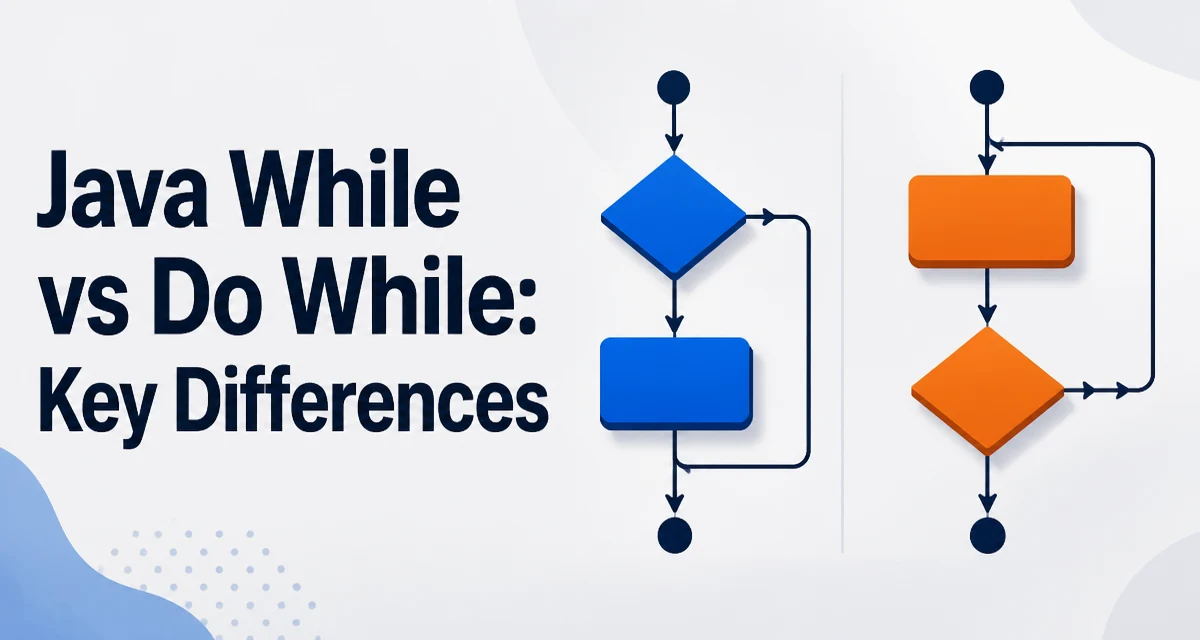
The practical difference between java while vs do while loops comes down to one question: when is the condition evaluated? The while loop evaluates its condition before executing the body. If the condition is false on the first evaluation, the body never runs. The do-while loop evaluates its condition after executing the body, which guarantees the body runs at least once.
int count = 0;

// while: condition checked first, body never runs
while (count < 0) {
    System.out.println("This never prints");
}

// do-while: body runs once, then condition is checked
do {
    System.out.println("This prints once");
} while (count < 0);
This timing difference is the only semantic distinction between the two constructs, but it drives every practical decision about which one to use.
Syntax Comparison
The two loops share the same basic structure with one key difference: the do-while loop places the condition at the end and requires a semicolon after the closing parenthesis.
while (condition) {
    // body
}

do {
    // body
} while (condition);
The semicolon after while (condition) in a do-while loop is mandatory. Omitting it produces a compilation error, and the compiler message can be confusing because the error is reported at the end of the loop rather than at the point where the semicolon is missing.
Both loops support the same control statements: break exits the loop immediately, and continue skips the rest of the current iteration and moves to the next condition check.
When do-while's Guaranteed First Execution Matters
A do-while loop is the natural fit when the body must execute at least once regardless of the condition. The classic example is a menu-driven program where the menu must be displayed before the user can make a choice:
Scanner scanner = new Scanner(System.in);
int choice;

do {
    System.out.println("1. Start");
    System.out.println("2. Configure");
    System.out.println("3. Exit");
    choice = scanner.nextInt();
    handleChoice(choice);
} while (choice != 3);
Using a while loop here would require initializing choice to a value that is not 3 before the loop, which is an artificial constraint that obscures the program's intent.
Another common case is retry logic where an operation must be attempted at least once before deciding whether to retry:
int attempts = 0;
boolean success;

do {
    attempts++;
    success = attemptOperation();
} while (!success && attempts < 3);
This pattern is common in network calls, database connections, and file operations where the first attempt is always required.
Common Mistakes and Edge Cases
The most frequent mistake is using a while loop when a do-while loop is the clearer choice. This usually manifests as a sentinel value:
int choice = 0; // sentinel: must not equal the exit value
while (choice != 3) {
    System.out.println("1. Start");
    System.out.println("2. Configure");
    System.out.println("3. Exit");
    choice = scanner.nextInt();
    handleChoice(choice);
}
This works, but the sentinel initialization is fragile. If the exit value changes, the sentinel must change too. A do-while loop eliminates the sentinel entirely.
Another edge case involves the continue statement. In a do-while loop, continue jumps to the condition check at the end of the loop. In a while loop, continue also jumps to the condition check, but the position of that check differs. This can produce different iteration counts when continue is used with a counter that is incremented at the end of the body:
int i = 0;
while (i < 5) {
    if (i == 2) {
        continue;
    }
    System.out.println(i);
    i++;
}
In this example, when i equals 2, continue skips the increment, so i stays at 2 forever, causing an infinite loop. The same pattern in a do-while loop has the same problem. The fix is to increment the counter before any continue statement, or to use a for loop where the increment is part of the loop header.
Performance and Runtime Behavior
From a performance perspective, there is no meaningful difference between while and do-while loops. Both compile to similar bytecode: a conditional branch and a backward jump. The JIT compiler applies the same optimizations to both, including loop unrolling and branch prediction.
The choice between them should be driven by semantics, not performance. The only runtime difference is the number of iterations: a while loop can execute zero times, while a do-while loop executes at least once. If the condition depends on external input and zero iterations are valid, a while loop avoids an unnecessary first execution.
Choosing Between while and do-while
Use while when the loop may legitimately execute zero times. This is common when iterating over a collection that could be empty, or when a condition must be evaluated before any work is performed.
Use do-while when the body must execute at least once. This is common for user input, menu display, and retry logic.
| Criterion | while | do-while |
|---|---|---|
| Condition check | Before body | After body |
| Minimum executions | 0 | 1 |
| Semicolon after condition | Not required | Required |
| Typical use | Possibly-empty data | User input, menus, retries |
A practical rule: if you find yourself initializing a variable to a sentinel value just to make a while loop enter its body, a do-while loop is the clearer choice. The sentinel is a code smell that signals the wrong loop was selected.