Python String Indexing: Syntax, Slicing, and Edge Cases
python string indexing: Learn how Python string indexing works: positive and negative indices, slicing syntax, common errors, immutability, and performance implications.
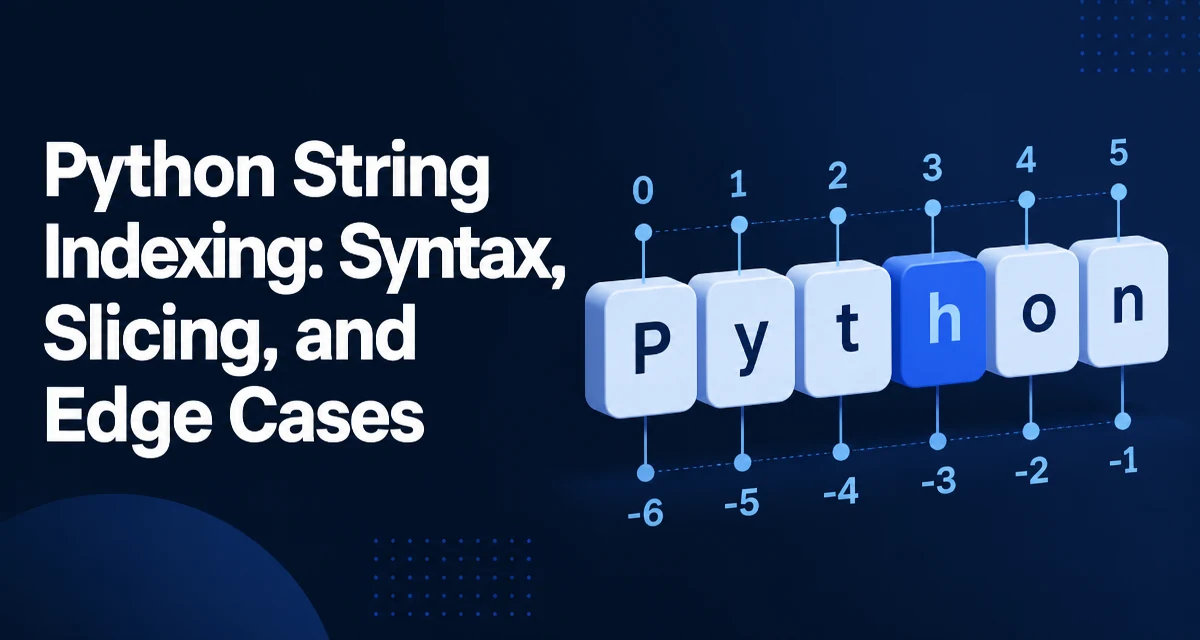
Python string indexing is the mechanism that lets you access individual characters in a string by their position. Unlike some languages that treat strings as arrays of bytes, Python strings are sequences of Unicode code points, and indexing works on those code points directly. Understanding how indexing behaves is fundamental to writing correct string-processing code, whether you are parsing user input, extracting substrings, or validating data formats.
How Python String Indexing Works
Python uses zero-based indexing. The first character of a string is at index 0, the second at index 1, and so on. The last character is at index len(s) - 1. This is consistent with lists and tuples, so if you already know how indexing works for other sequence types, the same rules apply here.
s = "python"
print(s[0])  # 'p'
print(s[1])  # 'y'
print(s[5])  # 'n'
Attempting to use an index that is greater than or equal to the length of the string raises an IndexError. For example, s[6] on a six-character string fails because valid indices are 0 through 5.
s = "python"
try:
    print(s[6])
except IndexError as e:
    print(e)  # string index out of range
This behavior is intentional: it prevents silent access to memory beyond the string's allocated storage, which is a common source of bugs in lower-level languages. In Python, the interpreter checks the bounds for you, but you still need to handle the exception when working with dynamic input.
Negative Indices and Reverse Access
Python also supports negative indices, which count from the end of the string. The index -1 refers to the last character, -2 to the second-to-last, and so on. This is a concise way to access trailing characters without computing the length explicitly.
s = "python"
print(s[-1])  # 'n'
print(s[-2])  # 'o'
print(s[-6])  # 'p'
Negative indices are especially useful when you need to check the last character of a string, such as verifying a file extension or a trailing newline. The expression s[-1] is more readable than s[len(s) - 1] and avoids an extra function call.
The valid range for negative indices is from -len(s) to -1. Using -len(s) - 1 or lower raises an IndexError. This symmetry with positive indices means that any valid index can be expressed as either a positive or negative number, but mixing them in a single expression can lead to confusion. For clarity, choose one convention per operation.
Slicing Strings with Index Ranges
Slicing extends indexing to retrieve a contiguous substring. The syntax s[start:stop] returns characters from index start up to but not including stop. Both start and stop are optional, and negative indices work here as well.
s = "python"
print(s[0:2])   # 'py'
print(s[2:])    # 'thon'
print(s[:4])    # 'pyth'
print(s[-3:])   # 'hon'
print(s[::2])   # 'pto'  (every second character)
A step value can be added as a third parameter: s[start:stop:step]. The step can be negative to reverse the string or to traverse from the end. For example, s[::-1] returns the reversed string.
s = "python"
print(s[::-1])  # 'nohtyp'
print(s[5:0:-2])  # 'ntp'
Slicing never raises an IndexError when the indices are out of bounds; it simply clamps to the valid range. This is different from single-character indexing. For instance, s[0:100] returns the whole string, and s[100:200] returns an empty string. This behavior is convenient for safe substring extraction but can mask logic errors if you assume the slice length matches your expectation.
Common Indexing Errors and How to Avoid Them
The most frequent error is an off-by-one mistake when using positive indices. Since indexing starts at zero, the last character is at len(s) - 1, not len(s). This often appears in loops that iterate over indices.
s = "python"
for i in range(len(s)):
    print(s[i])  # correct: i goes from 0 to 5
A common mistake is using range(1, len(s)) to skip the first character, but forgetting that the last index is len(s) - 1. The range stop value is exclusive, so range(1, len(s)) correctly covers indices 1 through len(s) - 1.
Another pitfall is assuming that a string is mutable. If you try to assign to an index, you get a TypeError because strings are immutable.
s = "python"
try:
    s[0] = 'P'
except TypeError as e:
    print(e)  # 'str' object does not support item assignment
To modify a character, you must create a new string, for example by slicing and concatenating: s = 'P' + s[1:]. This is a fundamental design decision that affects how you approach string manipulation.
Indexing and Immutability: What You Cannot Do
Because strings are immutable, every indexing operation is read-only. You cannot change a character in place, and you cannot extend or shrink a string without creating a new object. This has practical implications for performance and memory usage.
When you need to build a string character by character, avoid repeated concatenation inside a loop because each + creates a new string and copies the existing content. Instead, collect parts in a list and join them at the end.
chars = []
for i in range(len(s)):
    if s[i].isalpha():
        chars.append(s[i].upper())
result = ''.join(chars)
This pattern is more efficient because list.append is amortized O(1), and join performs a single pass to allocate the final string. Indexing itself is O(1) for any position, but the immutability constraint forces you to think about how you assemble new strings.
Performance and Memory Considerations
Indexing a single character is O(1) in both time and memory because Python stores the string's characters in a contiguous block and can compute the memory address directly from the index. This is true for both positive and negative indices; the interpreter translates negative indices to their positive equivalent internally.
Slicing, however, creates a new string object that copies the selected characters. The time and memory cost is proportional to the length of the slice, not the length of the original string. For large strings, taking a small slice is cheap, but taking a slice that covers most of the string duplicates a significant amount of data.
large = "a" * 10_000_000
sub = large[5_000_000:]  # copies 5 million characters
If you only need to inspect a few characters, use indexing or a small slice rather than creating a large substring. For example, to check if a string starts with a certain prefix, s.startswith(prefix) is more efficient than slicing s[:len(prefix)] because it avoids the copy.
Memory usage also matters when processing many strings. Since slicing creates new objects, holding onto slices of a large string prevents the original from being garbage-collected if the slice is still referenced. This is rarely a problem in short-lived scripts but can become relevant in long-running services that process large payloads.
Practical Patterns: Checking Characters, Parsing, and Validation
Indexing is often used for simple validation tasks. For example, checking the first and last characters of a string can be done with s[0] and s[-1]. This is common when verifying that a string is quoted, or that a filename has the expected extension.
def is_quoted(value):
    return len(value) >= 2 and value[0] == '"' and value[-1] == '"'
Another pattern is iterating over a string with an index when you need to know the position of each character. The built-in enumerate function is usually clearer than managing an index manually.
for i, char in enumerate(s):
    if char.isdigit():
        print(f"Digit {char} at position {i}")
When you need to parse a fixed-width format, indexing and slicing let you extract fields without splitting on delimiters. For example, a date string "2025-03-14" can be split into year, month, and day using slices.
date = "2025-03-14"
year = date[0:4]
month = date[5:7]
day = date[8:10]
This approach is concise but assumes the input always has the expected length. For variable-length input, consider using str.split or regular expressions, which are more robust to formatting variations.
Choosing Between Indexing and Other String Methods
Indexing gives you direct access to individual characters, but Python's string methods often express intent more clearly. For example, s.startswith(prefix) and s.endswith(suffix) are more readable than s[:len(prefix)] == prefix and s[-len(suffix):] == suffix. Similarly, s.find(sub) returns the index of a substring, which you can then use with slicing to extract the surrounding context.
Use indexing when you need a specific character or a fixed-offset slice. Use dedicated methods when you are checking for a pattern at the beginning or end, or when you need to search for a substring. Mixing both is common: first locate a delimiter with find, then slice around that index.
email = "user@example.com"
at = email.find('@')
if at != -1:
    local = email[:at]
    domain = email[at+1:]
This pattern is efficient because find scans the string once and slicing creates two new strings only for the parts you need. If you were to split on @ without checking, you might get unexpected results when the address contains multiple @ symbols.
Indexing is a low-level tool, but it composes well with other string operations. The key is to choose the right level of abstraction for the task: direct indexing for fixed positions, slicing for ranges, and higher-level methods for pattern-based logic.